Self-Ordering Kiosk System for Restaurant-Complete Guide
The way people order food has changed dramatically in the last decade. From paper menus and counter orders to mobile apps and contactless payments, restaurants continually adapt to meet customer expectations for speed, convenience, and personalization. One of the most transformative technologies in this evolution is the self-ordering kiosk: an on-premises digital terminal that lets guests browse a menu, customize items, pay and place orders without direct staff intervention. This article walks through everything restaurants need to know about Self-Ordering Kiosk System for Restaurant : what they are, how they work, benefits and downsides, implementation strategies, hardware and software components, integration and operations, user experience design best practices, data and analytics opportunities, security and compliance concerns, ROI considerations, and tips for a successful rollout. At the end we’ll briefly present ZenKiosk as an example product that captures many of the best practices discussed.
What is a Self-Ordering Kiosk System?
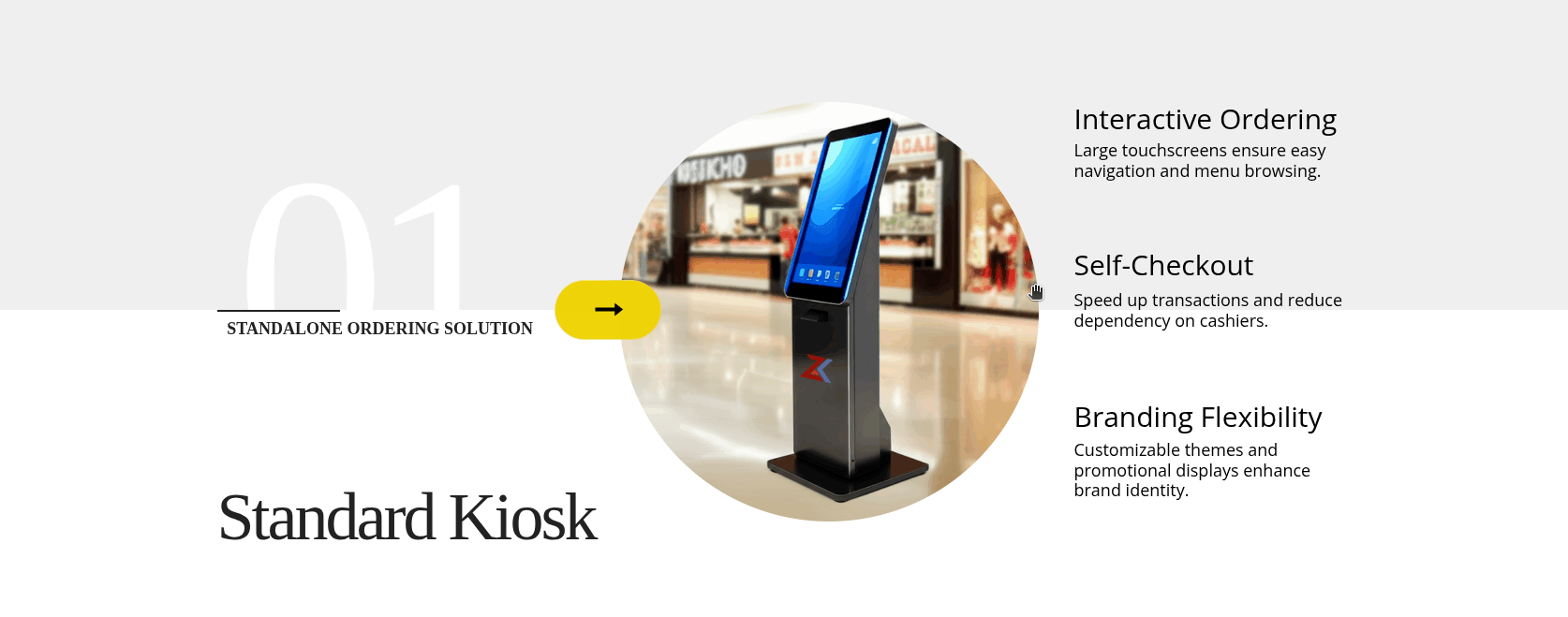
A self-ordering kiosk system is a combined hardware and software solution placed inside a restaurant (or in its drive-thru) that allows customers to independently view the menu, build and customize orders, select add-ons, apply discounts or loyalty rewards, and complete payment. Kiosks range from small tablet stands to large freestanding touchscreens and are commonly connected to the restaurant’s point-of-sale (POS), kitchen display system (KDS), payment processors, and back-office systems.
Key characteristics:
-
On-premises digital interface for customers.
-
Real-time order submission to kitchen/POS.
-
Integrated payments (card, contactless, QR, mobile wallets).
-
Customization and upsell prompts built into the ordering flow.
-
Data capture for analytics (orders, preferences, timing).
Why Choose Self-Ordering Kiosk System for Restaurant : Core Benefits
Self-ordering kiosks can bring immediate operational and customer experience gains when implemented thoughtfully. The core benefits are:
-
Higher Average Order Value (AOV)
Kiosks reduce staff pressure and give more room for suggested add-ons, combos, and visual merchandising. Studies from various operators show uplifts in AOV driven by automated up-sell prompts and easier add-on discovery. -
Faster Throughput & Reduced Wait Times
Multiple kiosks let several customers order simultaneously, reducing line bottlenecks. Coupled with optimized menus and pre-configured favorites, kiosks speed up ordering during peak periods. -
Labor Efficiency
With kiosks taking orders, staff can be reallocated to food preparation, delivery, table service, or tasks that improve guest experience. This is especially valuable where labor costs are high or hiring is difficult. -
Order Accuracy
When customers input their own selections and customizations, errors from verbal miscommunication drop. Kiosks produce precise, detailed orders to the kitchen. -
Consistent Upselling & Promotions
Kiosks deliver consistent, data-driven promotions, ensuring offers are surfaced uniformly rather than relying on busy employees to remember or mention them. -
Enhanced Customer Privacy & Comfort
Some customers prefer ordering without interaction — for example, when ordering sensitive items or in cultures where minimal conversation is appreciated. -
Data & Personalization
Kiosks capture first-party data: items chosen, modifiers, time patterns, and loyalty ties. That data enables targeted promotions, smarter inventory planning, and improved menu optimization. -
Accessibility Options
Properly designed kiosks can include language selection, text size adjustments, and accessibility modes, making ordering simpler for a wider audience.
Potential Drawbacks and How to Address Them
No technology is a silver bullet. Restaurants must understand common pitfalls.
-
Upfront Costs
Purchasing kiosks, mountings, secure enclosures, POS integrations and software licenses is an investment. Mitigation: start with a pilot, choose scalable hardware, and calculate payback using projected AOV lifts and labor savings. -
Customer Adoption Resistance
Not every customer will want to use a kiosk immediately — older guests or technophobic patrons may prefer human interaction. Mitigation: keep staff on hand to assist, create clear signage, and maintain a staffed ordering lane. -
Maintenance & Downtime
Hardware failures, software bugs, or network outages can disrupt service. Mitigation: choose reliable vendors, implement automatic fallback routing (send orders to a staffed POS), and schedule preventive maintenance. -
Integration Complexity
Kiosks must work with POS, KDS, loyalty and payment systems. Mitigation: prioritize vendors with open APIs and integration experience; begin with essential integrations then expand. -
Security & Compliance
Payment data, personal information and stored profiles must be secured to avoid breaches. Mitigation: use certified payment modules (PCI DSS compliant), encryption, and regular audits. -
Design Missteps
Poorly designed flows can cause confusion, abandoned carts, and slow ordering. Mitigation: invest in UX design, test with real users, and iterate based on analytics.
Hardware Components
Selecting the right hardware is part practicality, part brand expression. Common hardware components:
-
Touchscreen Terminal: Sizes vary from 10–24 inches for countertop/tablet stands to 27+ inch vertical displays for freestanding kiosks. Multi-touch and high brightness are desirable.
-
Enclosures & Stands: Secure, vandal-resistant casings for public spaces with options for branding wraps.
-
Printer / Receipt Options: Receipt printers or digital receipts via email/SMS/QR codes. In some fast-casual places, receipts include order numbers for collection.
-
Payment Module: Integrated card readers, NFC readers for contactless payments, and QR code scanners for mobile wallets.
-
Network Connectivity: Wired Ethernet preferred for reliability, with Wi-Fi as backup. Cellular failover can be beneficial.
-
Cameras & Sensors (Optional): For analytics (queue length, repeat customers) or security. Use responsibly and with privacy notices.
-
Peripherals: Barcode/QR scanners, scales (for self-checkout grocery hybrid), and headphone jacks for accessibility prompts.
When choosing hardware, prioritize durability, replaceability of parts, and vendor warranties.
Software Components & Architecture
Software is the brain of the kiosk system.
Kiosk Frontend
The user interface running on the touchscreen — often a web or native application built for responsiveness and touch gestures.
Kiosk Middleware / Orchestration
Ensures local caching, offline support, transaction queuing (if network drops), and synchronization. It mediates between frontend, POS, and back-office.
POS Integration Layer
Translates kiosk orders into POS-compatible formats and ensures real-time inventory and pricing updates. Deep integrations support modifiers, seat numbers, and kitchen routing.
Payment Processing
Securely handles card entry, tokenization, receipts, and settlement. Must meet PCI DSS requirements.
KDS / Kitchen Routing
Orders from kiosks should appear in the kitchen display with correct timing, priority, and modifiers, ensuring food gets made correctly and in sequence.
Back-Office & Management Console
Central dashboard for menu updates, promotions, content scheduling, health monitoring of kiosks, and consolidated reporting.
Analytics & CRM
Tools to analyze order patterns, AOV, conversion rates, and customer preferences. Integration with loyalty and marketing platforms enables targeted campaigns.
Security & Monitoring
Endpoint protection, encryption, audit logging, and remote monitoring for uptime and performance.
Cloud vs Edge considerations: Many systems use cloud dashboards with local edge components to keep the kiosk working during connectivity outages.
Integration Best Practices
Kiosk systems are most valuable when tightly integrated into restaurant operations.
-
Synchronous Menu Management: Menu changes, price updates and available modifiers must update across kiosks, staff POS and online ordering in real time to prevent mismatches.
-
Unified Order Routing: Establish rules for routing kiosk orders to the KDS, printers, or prep stations with clear priority levels (e.g., dine-in vs takeout).
-
Inventory Sync: Prevent over-selling by maintaining inventory/ingredients contrasts across channels.
-
Loyalty & Guest Profiles: Integrate loyalty programs so customers can sign in at kiosks to redeem points or apply offers.
-
Kitchen Workflow Alignment: Ensure the kitchen sees the same level of detail (modifiers, cook times, allergen flags) as staff input.
-
Fallback Mechanisms: If integrations fail, have safe fallbacks such as sending orders to a staffed POS queue.
Operations & Staff Training
Kiosks change operations. Staff must be trained on new workflows.
-
Role Reassignment: Train staff to assist kiosk users during launch, monitor kiosks for issues, and focus on food prep and service quality.
-
Troubleshooting Guides: Provide step-by-step manuals for common problems (printer jams, network resets, card reader disconnects) and quick access to vendor support.
-
Content Updates: Assign someone to manage daily promotions, menu changes and content freshness.
-
Peak Strategy: Decide whether to open more kiosks during peak times or redirect customers to staff for faster service.
-
Hygiene & Cleaning: Establish cleaning schedules and use antimicrobial screen protectors or clear signage encouraging mobile ordering for hygiene-conscious patrons.
Security, Compliance & Privacy
Security is not optional for kiosks that accept payments and store personal data.
-
PCI DSS Compliance: Ensure payment flows and storage are compliant. Tokenize card data and use certified payment gateways.
-
Encryption & Network Segregation: Use strong encryption for data in transit and at rest. Segregate kiosk networks from corporate networks where possible.
-
OS & Patch Management: Keep kiosk OS and applications updated to mitigate known vulnerabilities.
-
Physical Security: Secure mounting and locks to prevent tampering, and set up tamper detection monitoring.
-
Privacy Notices: Clearly communicate to customers how their data will be used and provide opt-outs for marketing.
-
Logging & Incident Response: Implement audit trails and a plan for responding to data breaches or fraud.
Partner with experienced vendors and insist on security certifications.
Measuring ROI and Cost Considerations
When evaluating kiosks, calculate both quantitative and qualitative returns.
Costs
-
Hardware purchase or lease.
-
Software licenses or subscription fees.
-
Integration and installation.
-
Ongoing maintenance and support.
-
Training and operations changes.
Benefits (monetized)
-
Incremental revenue from AOV uplift and increased throughput.
-
Labor reallocation savings or productivity improvements.
-
Reduced order errors and consequent waste.
-
Marketing and customer retention value from data capture.
A pilot with clear KPIs (AOV, conversion rate, orders per hour, error rate) helps estimate payback period. Many restaurants see payback in 12–24 months depending on volume and AOV increases, but results vary.
Checklist for Choosing a Kiosk Vendor
Use this checklist when evaluating kiosk vendors:
-
Proven POS & KDS integrations relevant to your current stack.
-
PCI DSS certification and secure payment architecture.
-
Local caching/offline capability.
-
Centralized content and menu management console.
-
Remote monitoring and health alerts.
-
Flexible hardware options and warranties.
-
Analytics and reporting features.
-
Accessibility and multilingual support.
-
Clear SLAs for uptime and support.
-
Transparent pricing and upgrade paths.
Self-ordering kiosks are no longer a novelty; they are a strategic tool for restaurants aiming to boost revenue, improve efficiency, and modernize the guest experience. Success hinges on careful UX design, tight integration with back-office systems, strong security practices, staff training, and iterative optimization driven by data. You should know about Self-Ordering Kiosk System for Restaurants. When implemented thoughtfully, kiosks help restaurants serve more guests, more accurately, and with higher average checks — while freeing staff to focus on hospitality and food quality.
Introducing ZenKiosk-Self-Ordering Kiosk System
If you’re looking for a modern, turnkey option to explore, consider ZenKiosk offered by ZenDynamix. Designed for quick deployment in fast-casual and full-service environments, ZenKiosk offers:
-
Modular hardware options (countertop tablets through freestanding kiosks).
-
A cloud management console for centralized menu updates, promotions, and remote monitoring.
-
Deep POS and KDS integrations with common restaurant platforms.
-
PCI-compliant payment handling with contactless and QR options.
-
Built-in analytics dashboard for conversion, AOV, and queue metrics.
-
Accessibility features (multi-language support, screen reader compatibility, adjustable font sizes).
-
Offline resilient architecture that queues orders locally during network interruptions.
-
White-glove installation and staff training services to accelerate adoption.
ZenKiosk is just one example; when evaluating any vendor, match their capabilities to the checklist and operational needs outlined above. Discover how Self-Ordering Kiosk System for Restaurant boost your sales, speed, and customer satisfaction.
ZenKiosk offers a fully customizable platform that adapts to your unique brand identity, menu structure, and operational requirements. The system supports extensive menu customization, multiple payment methods, loyalty program integration, and real-time analytics that provide actionable insights into your business performance.